
Helix technical overview
Helix is the operational layer over the Spiral Scheduler: a complete, deployable workforce management application that adds dedicated client instances, persistence, applications and governance around Spiral’s real-time optimisation. Preconfigured templates get a working solution running within hours. This page covers how it is built; for the business view see the Helix overview.
System architecture
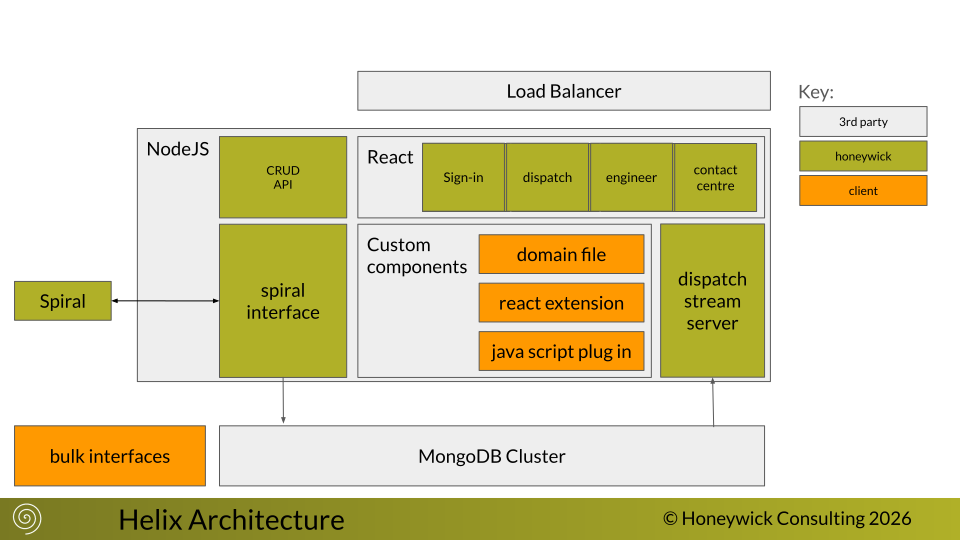
Section titled “System architecture”Each Helix instance is a self-contained, single-tenant deployment comprising:
- a MongoDB database;
- a CRUD layer with configuration plugins;
- React-based applications:
- Deployment Centre — manage resources, indoor desks and schedules;
- Contact Centre — manage customer projects;
- Engineer App — field engineers track status, projected times, skills and availability;
- Environment UI — control simulation runs and site configuration;
- a Spiral Scheduler instance for optimisation and business rules.
Core concepts
Section titled “Core concepts”- Helix Resource — a JSON document with a unique id describing current and past resource
activity. Resources extend Spiral resource definitions and carry a
resourceAuditof historical changes and positions; Helix uploads only the data Spiral needs. - Helix Project — customer service demand of varying complexity. Projects evolve as requirements develop and complete when no open, unfilled Spiral stops remain; completed projects persist in MongoDB until their retention period expires.
- Schedule stops — both projects and resources reference Spiral stops. Each
scheduleStopcarriesdid(desk),state,rid(allocated resource, null if unallocated) and timing fieldsdply/arv/fin. See the stopObject reference.
CRUD & schedule transactions
Section titled “CRUD & schedule transactions”Documents are inserted/updated in MongoDB (with optimistic locking on update), processed for derived
attributes per the domain rules, filtered to Spiral-relevant attributes, then forwarded to Spiral.
Explicit schedule changes use the schedule verb, with an update number for optimistic locking to
detect conflicting modifications.
Helix also provides auditing (any JSON attribute can be marked for audit, credited to the user or Spiral), archiving (delete projects by date, remove inactive resources) and a key service for generating unique ids.
Extension model
Section titled “Extension model”Helix is delivered as a containerised application together with Spiral, and clients shape it to their own business processes through two complementary modes:
- Mode 1 — configuration. Declarative domain files describe stop types, the cost model, roster and duty rules, and quality gates. See the documentation reference for the object model (for example stopParamsObject and resourceParamsObject).
- Mode 2 — code extension. Bespoke screens, integrations and logic are layered in through the client extension point and composed with the core at runtime, so customisations upgrade alongside Helix rather than forking it.
Typical integration hooks — the points where your process and systems connect — include:
- Incident management — incident-type projects with lifecycle and escalation hooks (
projectParams[type].helix.onCreate/onComplete, stoponStateactions) connect an external incident feed to the live plan. - Channel communication — the Contact-Centre contract search (
helix.app.contactCentre.searchPaths) plus an optionalsearchContracts()client resolver integrate CRM / telephony lookups into the front line. - External resource management —
resourceParams[type].helix.onCreate/onDeletelifecycle hooks sync externally-owned (partner / third-party) resources into the schedule as one pool.
See the development guides:
Try it
Section titled “Try it”Three live demonstration sandboxes — Breakdown Services, Blue Light and Rail — are available on request from the Helix overview.